AWS AI Security Best Practices
Amazon Web Services (AWS) provides a comprehensive suite of AI and machine learning services that require careful security configuration to protect sensitive data, models, and infrastructure. As organizations increasingly deploy AI workloads on AWS, understanding and implementing robust security controls becomes critical to prevent data breaches, model theft, and unauthorized access.
AWS AI services including Amazon SageMaker, AWS Bedrock, Amazon Rekognition, Amazon Comprehend, and Amazon Lex each present unique security challenges. SageMaker, as AWS's flagship machine learning platform, requires careful attention to notebook instance security, training job isolation, model endpoint protection, and data access controls. AWS Bedrock, which provides access to foundation models from leading AI companies, introduces additional considerations around API security, prompt injection prevention, and responsible AI usage.
The shared responsibility model in AWS means that while AWS secures the underlying infrastructure, customers are responsible for securing their AI applications, data, and configurations. This includes implementing proper Identity and Access Management (IAM) policies, encrypting data at rest and in transit, configuring Virtual Private Cloud (VPC) isolation, enabling comprehensive logging and monitoring, and ensuring compliance with industry regulations such as GDPR, HIPAA, and SOC 2.
Common security vulnerabilities in AWS AI deployments include overly permissive IAM roles, unencrypted S3 buckets containing training data, publicly accessible SageMaker notebook instances, insufficient network isolation, lack of model versioning and access controls, inadequate logging and monitoring, and failure to implement least privilege access principles. This guide provides comprehensive security best practices to address these challenges and build secure AI systems on AWS.
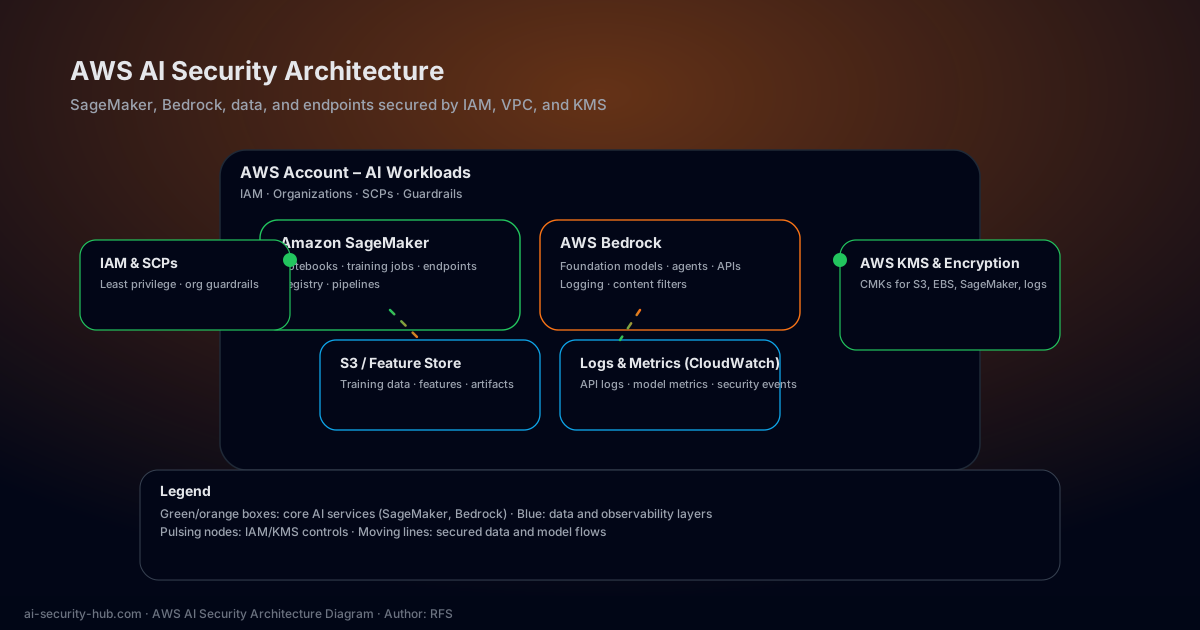
Animated view of the AWS AI security architecture, emphasizing IAM, VPC isolation, KMS encryption, and logging across SageMaker, Bedrock, and supporting data services.
- • VPC isolation and network controls
- • IAM roles and permissions
- • Encryption at rest and in transit
- • Model registry access control
- • Notebook instance security
- • Training job isolation
- • Endpoint authentication
- • API access controls
- • Data residency compliance
- • Model invocation logging
- • Content filtering policies
- • Prompt injection prevention
- • Rate limiting and throttling
- • Audit trail management
- • S3 bucket encryption
- • KMS key management
- • Data classification
- • Access logging and monitoring
- • Data lifecycle policies
- • Backup and recovery
- • Data loss prevention
Network Isolation
Deploy AI workloads in private VPCs with strict network segmentation to prevent unauthorized access and data exfiltration. Use VPC endpoints to keep traffic within the AWS network and avoid exposure to the public internet.
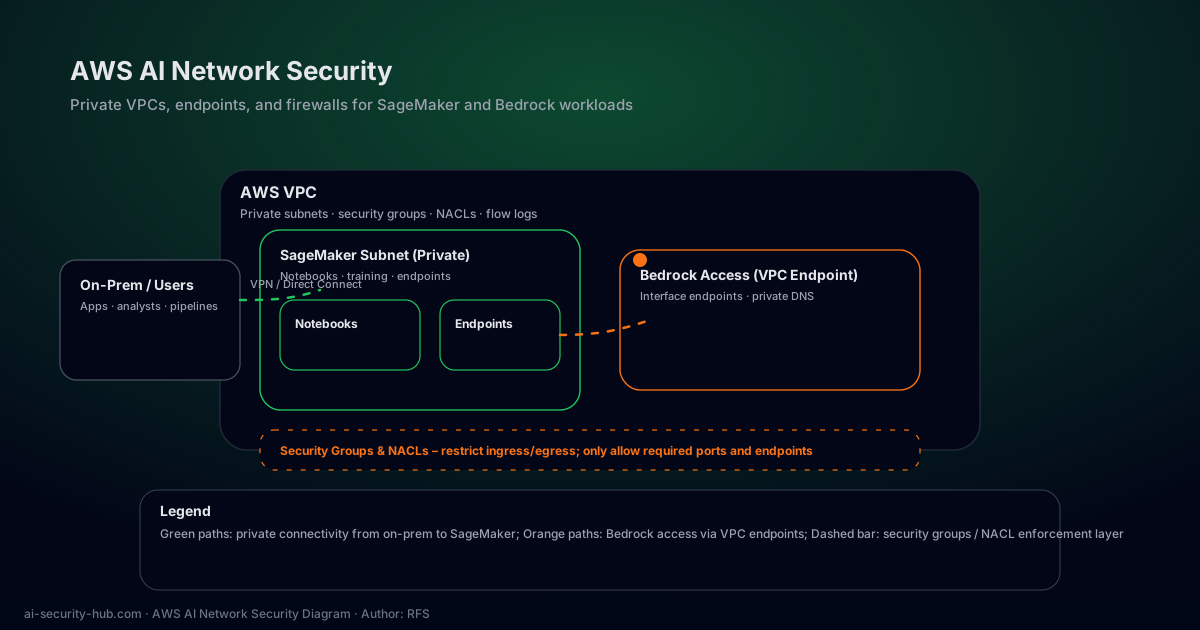
Animated network security layout for AWS AI, showing private VPC subnets, interface endpoints for Bedrock, VPN/Direct Connect paths, and security groups/NACLs enforcing traffic policies.
- • Use VPC endpoints for AWS service access without internet gateway
- • Implement security groups and NACLs for fine-grained traffic control
- • Enable VPC Flow Logs for monitoring and forensic analysis
- • Use PrivateLink for secure connectivity between VPCs and services
- • Isolate training, inference, and data processing workloads in separate subnets
- • Implement network segmentation based on data sensitivity levels
Identity and Access Management
Implement least privilege access with fine-grained IAM policies that grant only the minimum permissions required for each role. Use IAM roles instead of long-term access keys to reduce the risk of credential compromise.
- • Use IAM roles for EC2 instances and Lambda functions instead of access keys
- • Implement service control policies (SCPs) for organization-wide guardrails
- • Enable MFA for sensitive operations and privileged accounts
- • Regular access reviews and audits using AWS IAM Access Analyzer
- • Use IAM conditions to restrict access based on IP, time, and MFA status
- • Implement cross-account access with external ID for third-party integrations
Monitoring and Compliance
Comprehensive logging and monitoring for AI workloads enables threat detection, compliance auditing, and incident response. Centralize logs and implement automated alerting for security events.
- • CloudTrail for API activity logging and audit trails
- • CloudWatch for metrics, alarms, and operational insights
- • AWS Config for compliance tracking and configuration management
- • Security Hub for centralized security findings and compliance checks
- • GuardDuty for intelligent threat detection using machine learning
- • Macie for sensitive data discovery and protection in S3
Model Security and Governance
Protect machine learning models from theft, tampering, and unauthorized access through comprehensive model governance and security controls.
- • Use SageMaker Model Registry for version control and approval workflows
- • Implement model encryption at rest using AWS KMS
- • Enable model monitoring to detect data drift and model degradation
- • Use SageMaker Model Monitor for continuous quality and bias monitoring
- • Implement model access controls with resource-based policies
- • Enable model explainability with SageMaker Clarify
Data Encryption and Key Management
Encrypt all sensitive data at rest and in transit using AWS Key Management Service (KMS) with customer-managed keys for maximum control and compliance.
- • Use customer-managed KMS keys for S3, EBS, and SageMaker encryption
- • Enable automatic key rotation for enhanced security
- • Implement key policies with least privilege access
- • Use AWS Certificate Manager for TLS/SSL certificate management
- • Enable encryption in transit for all data transfers
- • Implement envelope encryption for large datasets
Secure SageMaker Notebook Configuration
Configure SageMaker notebook instances with VPC isolation, encryption, and restricted IAM permissions to prevent unauthorized access and data leakage.
# Create notebook instance in private subnet
aws sagemaker create-notebook-instance \
--notebook-instance-name secure-notebook \
--instance-type ml.t3.medium \
--subnet-id subnet-private \
--security-group-ids sg-restricted \
--kms-key-id arn:aws:kms:region:account:key/key-id \
--role-arn arn:aws:iam::account:role/SageMakerRole
Bedrock API Security Configuration
Implement secure API access to AWS Bedrock with IAM authentication, request logging, and content filtering to prevent abuse and ensure responsible AI usage.
{
  "Version": "2012-10-17",
  "Statement": [{
    "Effect": "Allow",
    "Action": "bedrock:InvokeModel",
    "Resource": "*",
    "Condition": {
      "IpAddress": {"aws:SourceIp": "10.0.0.0/8"},
      "Bool": {"aws:SecureTransport": "true"}
    }
  }]
}Nessus Vulnerability Scanner
Partner SolutionThe industry's most widely deployed vulnerability scanner. Identify security vulnerabilities, misconfigurations, and compliance issues across your infrastructure, cloud, and container environments. Essential for AI security assessments and penetration testing.
BlackBox AI Code Generation Platform
Partner ToolAI-powered code generation platform for developers. Generate, test, and secure AI code with advanced security features. Perfect for building secure AI applications and testing code vulnerabilities.